Halloween Bat Font: Spooky Wingdings for Every Project
Every autumn, a familiar creative itch returns. You need a quick, impactful way to add a dose of Halloween spirit to a project. Maybe it's a set of stickers for your Etsy shop, a playful social media graphic, or a set of decals for a local event. Searching through libraries of complex illustrations can be time-consuming, and hiring a designer for simple icons isn't always practical. What if the perfect spooky element was already sitting on your keyboard, ready to be typed out like any other letter?
A Dingbats Typeface That Does the Work for You
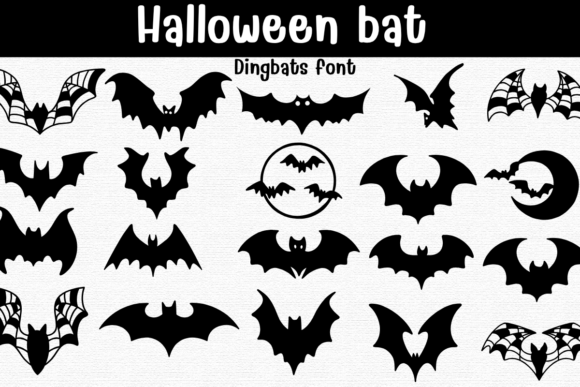
This is the core appeal of the Halloween Bat Font. It’s not a traditional letterform typeface but a specialized dingbats font, meaning each key you press summons a unique bat-themed icon instead of a character. Think of it as a curated clip art library that lives inside your font menu. The collection includes a fantastic range of designs: wide-winged silhouettes for dramatic headers, cute cartoon bats for a friendlier vibe, intricate webbed wings, crescent moon scenes, and circular badges that work perfectly as standalone stickers or logo elements.
Because each glyph is a clean, scalable vector, you have complete creative control. Fill them with solid black for a classic look, use a crisp outline for coloring pages, or apply any color gradient you can imagine. This vector quality means you can scale a tiny icon for a business card or blow it up for a poster without any loss of clarity. For designers and crafters, this is a fundamental advantage over raster-based images.
From Keyboard to Craft: Real-World Applications
The true value of a creative font like this is measured in its utility. How many different projects can it enhance? For small business owners and content creators, the answer is: a surprising number. Its playful, thematic nature makes it ideal for seasonal branding. Imagine using a bat badge as a temporary logo mark for October, or scattering a few subtle bat silhouettes across your website’s header for the month.
For those selling physical products, the applications are immediately practical. The included characters can be directly used in designing T-shirt graphics, party invitations, and scrapbook elements. Because the icons are mapped to the keyboard, you can type out a sequence in your preferred design software—like Procreate, Affinity Designer, or even Canva—to arrange a composition quickly. This is perfect for creating custom decals for mugs or laptops, stencil patterns for laser-cutting, or eye-catching poster layouts for haunted houses and fall festivals. The process is fast, allowing you to go from idea to mockup in minutes.
Integrating Thematic Elements into Your Brand Identity
While a display font like this isn't for body text, it can be a powerful tool in your broader design toolkit, especially when used thoughtfully. The key is to align its personality with your project's goals. A gothic, wide-winged bat might complement a high-contrast sans serif font for a edgier brand identity. A set of cuter, rounded bats could pair well with a friendly handwritten script for a children’s party theme.
Think about font pairing as a conversation. Your primary font handles the important information—names, dates, details—while the Halloween Bat typeface provides visual punctuation and thematic flair. Using it for bullet points, section dividers, or as a small icon next to a social media handle can inject personality without overwhelming your message. This approach maintains readability in your core content while still delivering the seasonal impact you want. It’s a strategic way to use a novelty font responsibly and effectively within modern typography standards.
Practical Tips for Using a Themed Typeface
Before diving in, a few practical considerations will help you get the most out of this design asset. First, always check the licensing. Most premium fonts for commercial use allow for projects like merchandise and digital products, but it's crucial to confirm the terms for your specific use case. Second, don't underestimate the power of testing. Try different color combinations and arrangements. Layer a solid black bat over a colored circle to create a badge effect. Use the outlines in a coloring book project.
Consider your medium. For laser or stencil crafts, the clean, bold outlines are a major advantage. For digital social media graphics, you can experiment with drop shadows or textures applied to the icons. The goal is to move beyond simply typing a single bat and thinking about how these elements can be composed. Combine a crescent moon with a perched bat, or create a border using a repeating pattern of small bats. This compositional flexibility is what elevates it from a simple novelty to a versatile component in your design asset library.
Ultimately, a font like Halloween Bat is about efficiency and creativity. It solves the specific problem of adding consistent, high-quality Halloween imagery to a wide array of projects. By treating it as a specialized tool in your creative arsenal, you can enhance visual engagement, maintain a cohesive seasonal look, and produce professional-looking materials that resonate with your audience, all without needing advanced illustration skills. It’s a reminder that sometimes the most effective design solutions are also the simplest to use.